Rowan James Moyle - UX Designer
Rowan James Moyle
UX Designer
Kumo Study
A Customisable, Intuitive UI to Improve Focus
Kumo Study
A Customisable, Intuitive UI to Improve Focus
Kumo Study
A Customisable, Intuitive UI to Improve Focus
Kumo Study
A Customisable, Intuitive UI to Improve Focus
Role
Lead UX Designer
Duration
3 Week Sprint
November
2023
Tools
Figma
Figjam
Trello
Miro
Canva
Team
Gabriela Mendelski
Rowan James Moyle
Tanya Carabez
Overview
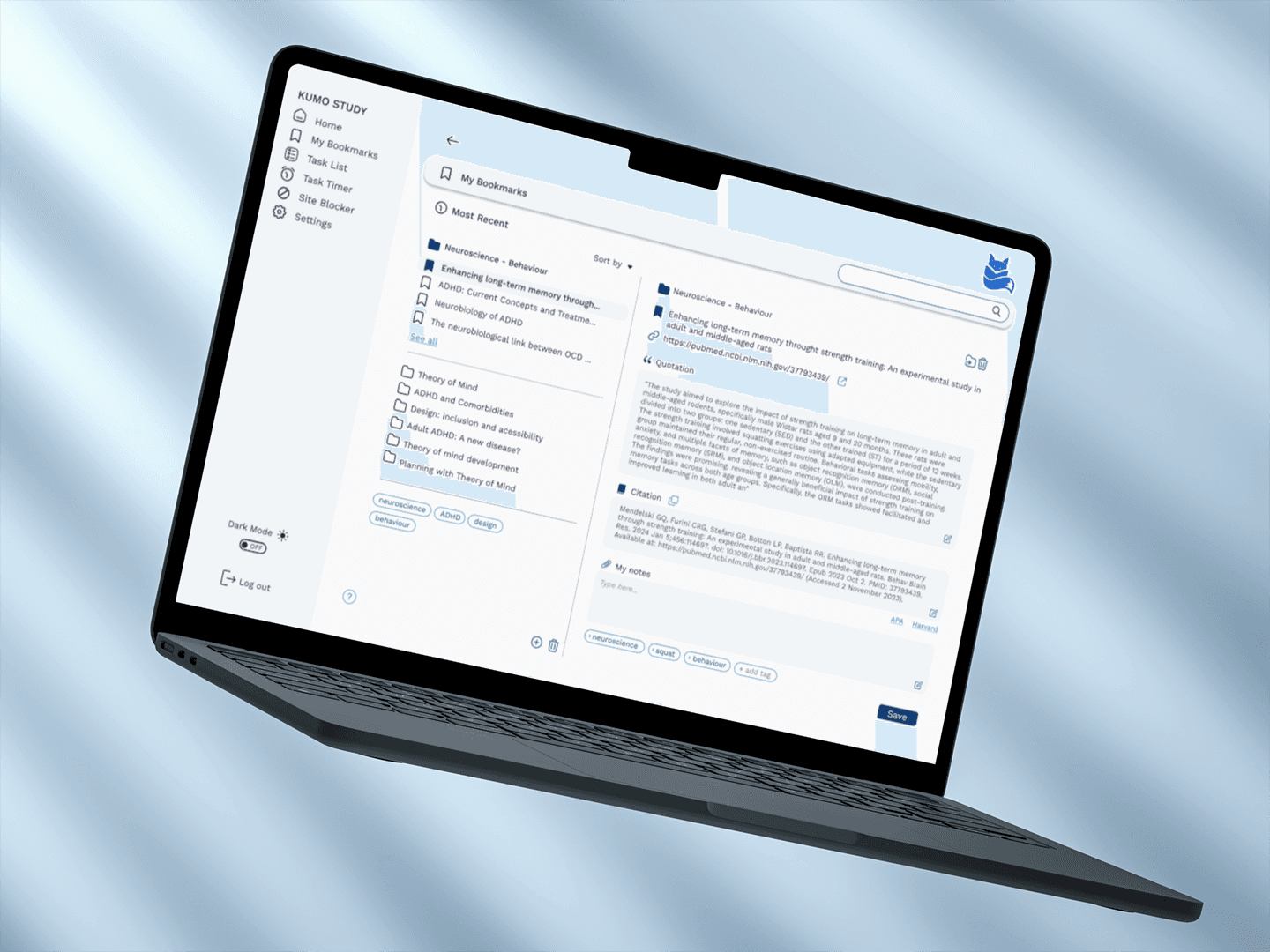
Kumo Study is a Chrome plugin redefining academic productivity for students who struggle to focus.
The Problem
As a product in its nascent stage, Kumo currently provides only basic functionality and a simple user interface. Initial research confirmed it would benefit greatly from a broader range of features and a more intuitive user interface, aligning it with the industry standard set by competitors offering single function study tools.
The Solution
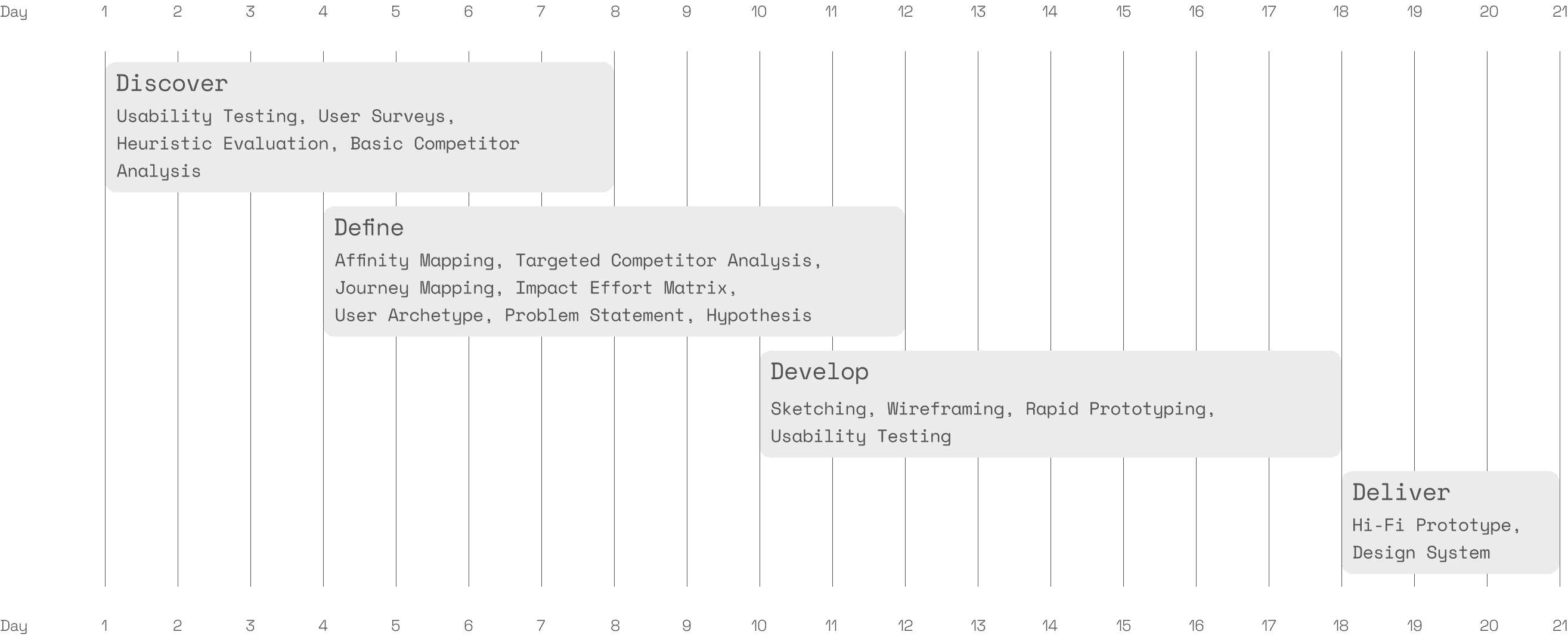
Over a period of three weeks, the website and study tool were overhauled. Our designs provide a blueprint for key updates, including a new user interface with additional features and options for personal customisation. The improvements were guided by an in-depth competitor analysis and iteration process identifying solutions to several issues reported in user surveys and usability tests.
Launched in October 2023, Kumo Study is dedicated to helping students streamline their process when writing essays and preparing for their next exam. Kumo Study has set itself apart from other single function study tools, by providing an all-in-one alternative specifically marketed to students with ADHD. The plugin currently allows students to save bookmarks and web citations, block distracting websites, set a pomodoro timer, and create task lists.
Launched in October 2023, Kumo Study is dedicated to helping students streamline their process when writing essays and preparing for their next exam. Kumo Study has set itself apart from other single function study tools, by providing an all-in-one alternative specifically marketed to students with ADHD. The plugin currently allows students to save bookmarks and web citations, block distracting websites, set a pomodoro timer, and create task lists.
(Use larger device like a tablet or computer for more in depth information about this project).
The Problem
As a product in its nascent stage, Kumo currently provides only basic functionality and a simple user interface. Initial research confirmed it would benefit greatly from a broader range of features and a more intuitive user interface, aligning it with the industry standard set by competitors offering single function study tools.
The Solution
Over a period of three weeks, the website and study tool were overhauled. Our designs provide a blueprint for key updates, including a new user interface with additional features and options for personal customisation. The improvements were guided by an in-depth competitor analysis and iteration process identifying solutions to several issues reported in user surveys and usability tests.
Project Timeline
Discover
Embarking on this project with
Kumo Study, we quickly delved into research to uncover the true potential of the study tool.
Embarking on this project with Kumo Study, we quickly delved into research to uncover the true potential of the study tool.
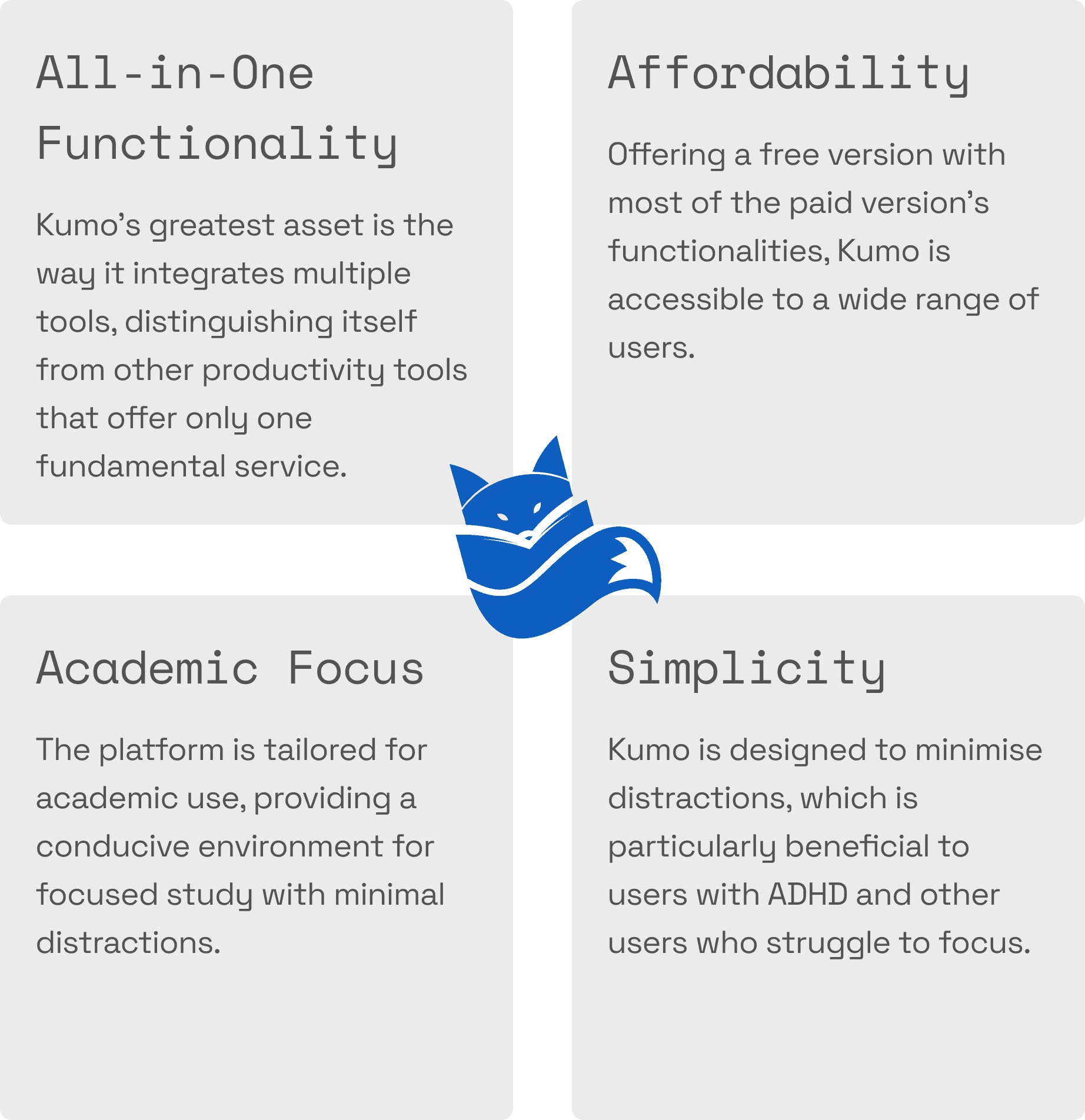
In our initial meeting we learned about Kumo's unique selling points and summarised them (right). We then supplemented existing user feedback with a new survey and usability tests targeting a range of users, including those with ADHD. The survey utilised open-ended and scaled questions, while the usability test could be completed remotely and covered each of the plugin’s tools. This provided us with both qualitative and quantitative data to unpack.
Discover
Early conversations revealed the importance of universal design.
Since the pandemic and the switch to remote learning, tertiary dropout rates for students with ADHD have increased dramatically. We learned that Kumo's primary mission is to lessen the academic burden on these students. Totally inspired by Kumo's mission, we read extensively about designing for people with ADHD, and decided to utilise recommendations from Lorna Mcknight's (2010) 'Designing for ADHD'. McKnight's guidelines (listed below) became a mantra guiding our process. However, we also recognised that these guides align with minimalist design principles and that many people struggle to focus while studying, not strictly those diagnosed with ADHD. Universal design, where products are created to be accessible and usable by as many people as possible, without the need for adaptation, became key. We agreed that approaching design problems with this mindset would also help Kumo reach a wider audience and benefit as many people as possible.
Design strategies that enhance concentration for every type of learner:
Design with a neat and uncluttered layout.
Provide a calm environment, with soothing colours, avoiding decorations or distractions.
Text in columns: avoid long paragraphs that take up the entire screen.
Organise items in an orderly way. Signpost and group related information into clear sections.
Use simple san-serif fonts like Helvetica.
Define
Our research suggested that the tools themselves are the problem.
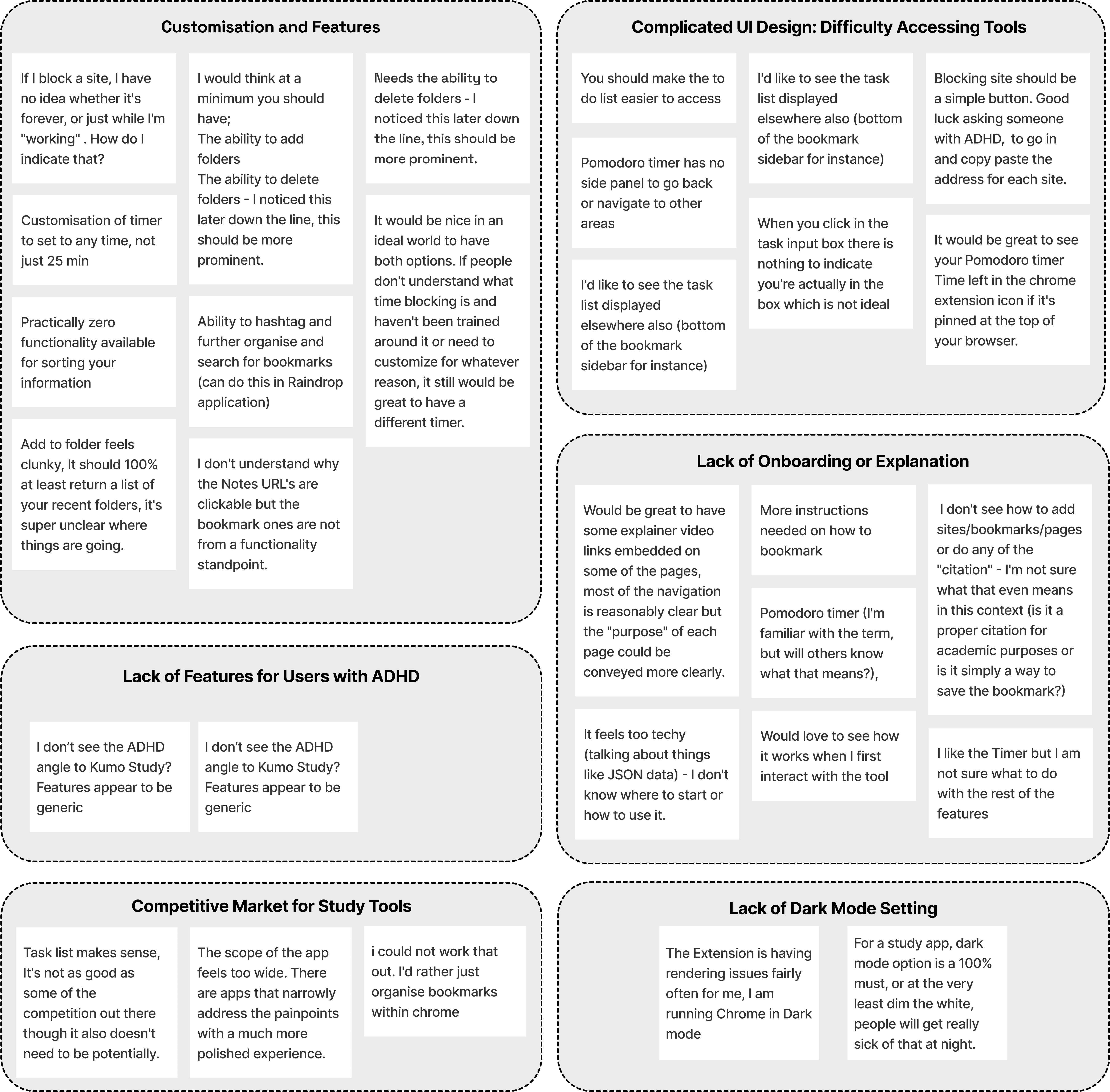
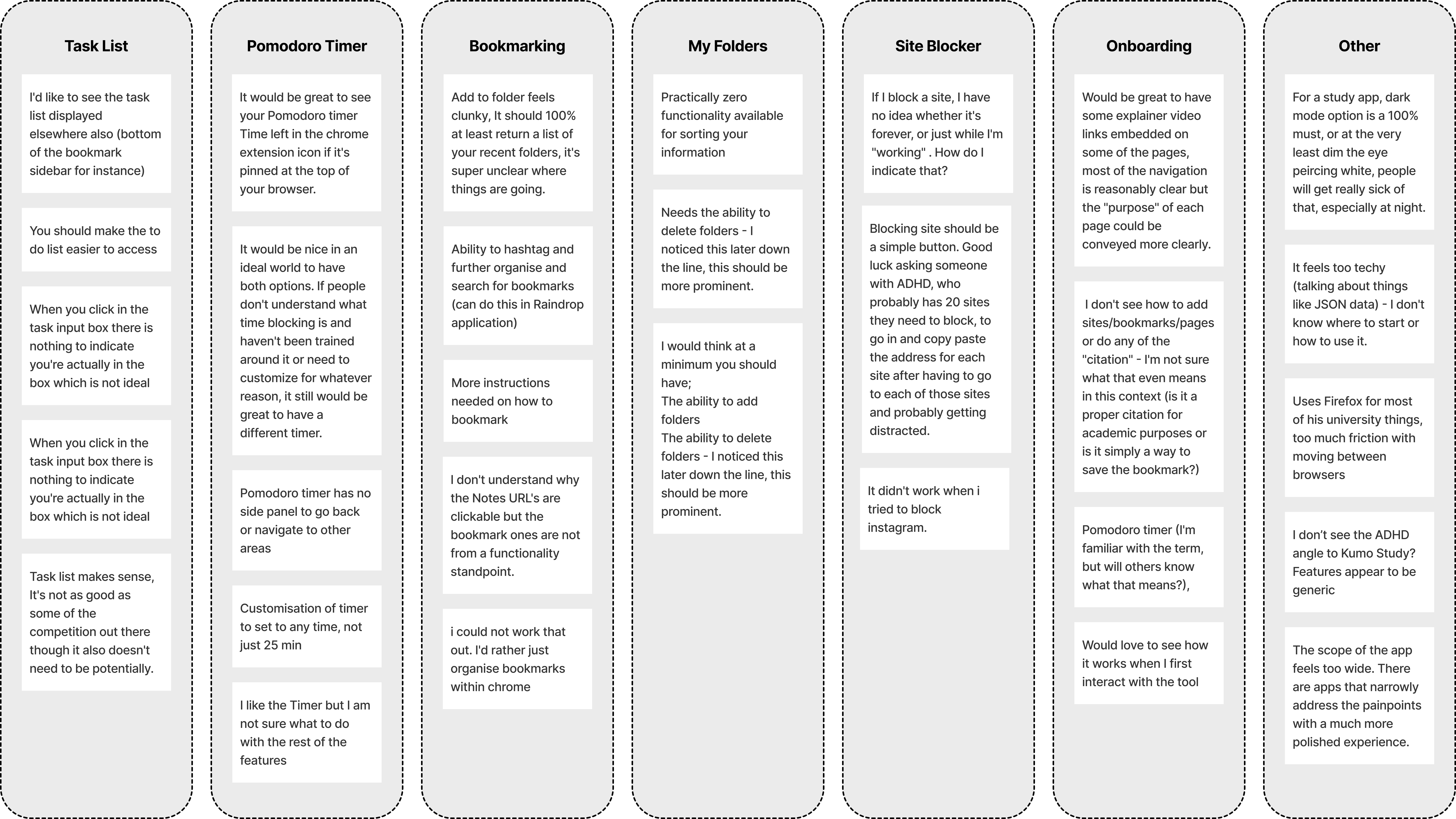
To analyse and interpret the extensive data we collected from the survey and usability tests, we used affinity mapping. This allowed us to comprehensively organise and understand the diverse range of feedback and insights gathered visually. We started to see some trends in the feedback and deduced several pain points:
Complicated UI design: It was difficult to access the tools.
Customisation and Features: Non-intuitive controls lacking features.
Lack of help or onboarding: No explanations or reminders to indicate how the tools function.
ADHD accessibility: The tool did not seem uniquely tailored to users with ADHD, despite the marketing.
Standing out: The market is saturated with study tools and single-function tools are currently doing the job better.
Dark Mode: Multiple users requested a dark mode setting as they study late at night.
Here is a simplified representation of the affinity map showing some of the key feedback we received:
It was also insightful to look at how this feedback applied to each of the tools available:
A Targeted Competitor Analysis
Knowing the tools lacked the functionality and versatility of other study tools on the market, we took a more extensive look at what the competition is doing well. This showed us some key features Kumo is missing and offered some insights about UI along the way.
After the affinity map pinpointed the areas needing improvement, it was clear that we should take a more extensive look at what the competition is doing, specifically the additional features and customisation options they offer. As stated there was no all-in-one tool to compare Kumo with, but we looked at numerous popular single-function tools to see what they were doing differently. The table below demonstrates the additional features we saw these competitors currently provide.
An important consideration emerged regarding bookmarking and referencing. It seemed unclear whether Kumo's current tool was trying to be a citation tool or a bookmarking tool, or both. This ambiguity was a weakness impacting the tools functionality. There were two solutions to this problem: they needed to excel in one area or both. Improving bookmarking with a supplementary citation feature for websites offered differentiation, while improving referencing (an evidently more complex process) would likely require a significant investment in time and resources.











Tasklists and Project Management Tools
Trello | Notion | Asana
Organise tasks with checklists and subtasks
Workflow templates for quick setup
Embed notes and documents in tasks
Sidebar for swift task navigation
Bookmarking and Referencing
MyBib | Citationsy | Raindrop.io | MyMind
Tagging and bookmarking both quotes and articles
MyMind features image bookmarking with AI search
Reference diverse mediums
Reference various academic styles
Tasktimers
Habitica | Forest | Marinara
Compact browser window or widget
Timer visibility within the widget icon itself
Additional duration customisation option
Statistics
Gamification (Forest and Habitica)
Site Blocker
BlockSite Chrome Plugin
Organise tasks with checklists and subtasks
Workflow templates for quick setup
Embed notes and documents in tasks
Sidebar for swift task navigation
Define
We knew what was missing and we were almost ready to start sketching out some ideas, but we needed to narrow our focus somewhat.
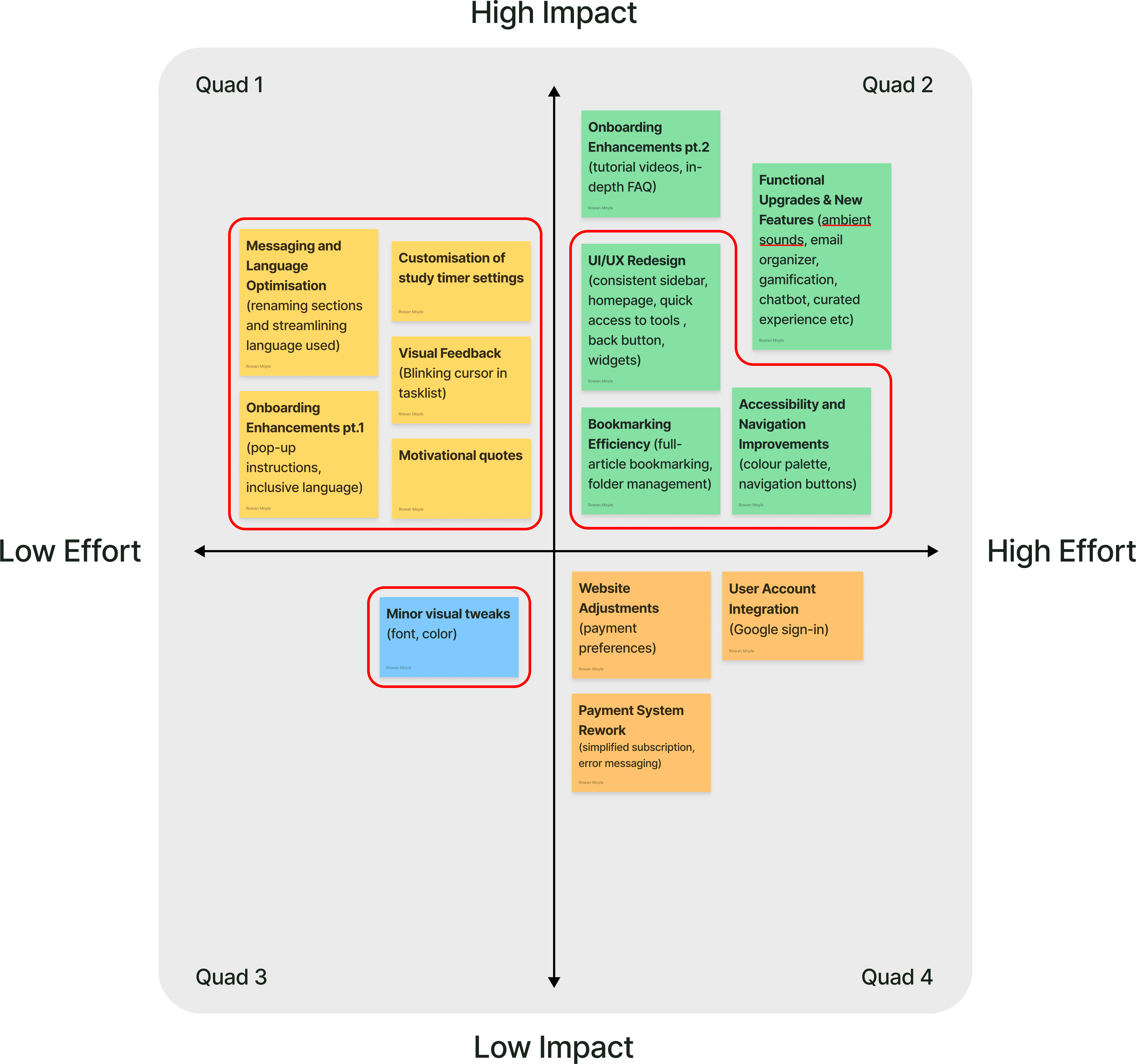
We began brainstorming solutions using our key findings and insights as a guide. This process produced a long list of potential improvements to the website and plug-in tools. We shared a Google document including each tool and the corresponding changes we would like to make and the document had become several pages long. Our interactions with the Kumo team had also included mention of features like gamification and chat-bot onboarding. Factoring in the scope of our three week timeframe and financial constraints, we decided to focus on achievable goals that would provide the largest impact for the lowest effort by using an impact-effort matrix.
Impact Effort Matrix
Necessary near-term design solutions are marked in red
Feedback highlighted need for some significant updates to the UI
Some resource-intensive updates necessary for market viability. (Complete UI Redesign & Bookmarking Folder Management System)
We developed another detailed feature prioritisation list document to to be used as a base in the design iteration phase
Deliver
Here is a detailed overview of our design solution, a high-fidelity prototype produced in Figma.
Having established a solid, research-informed plan and a precise and measured list of features to include, we moved forward with sketching, wireframing and prototyping. The detailed design package we created for both the Kumo Study website and its plug-in is presented in the following sections. Also the prototype can be accessed using the following link.
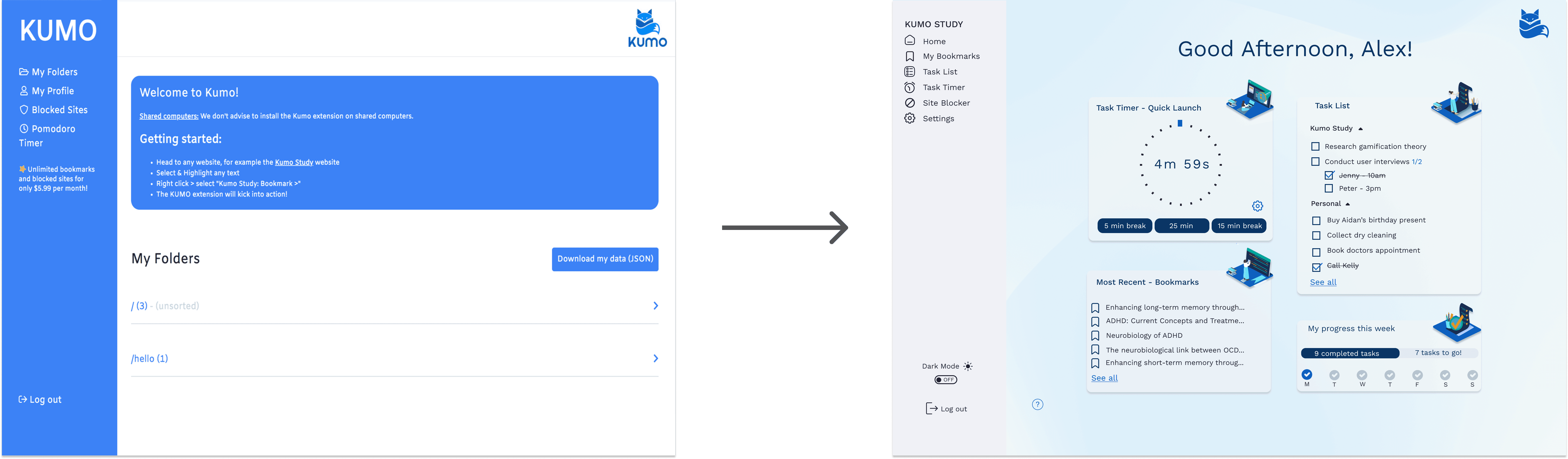
Existing Home Screen and New Design
Dashboard
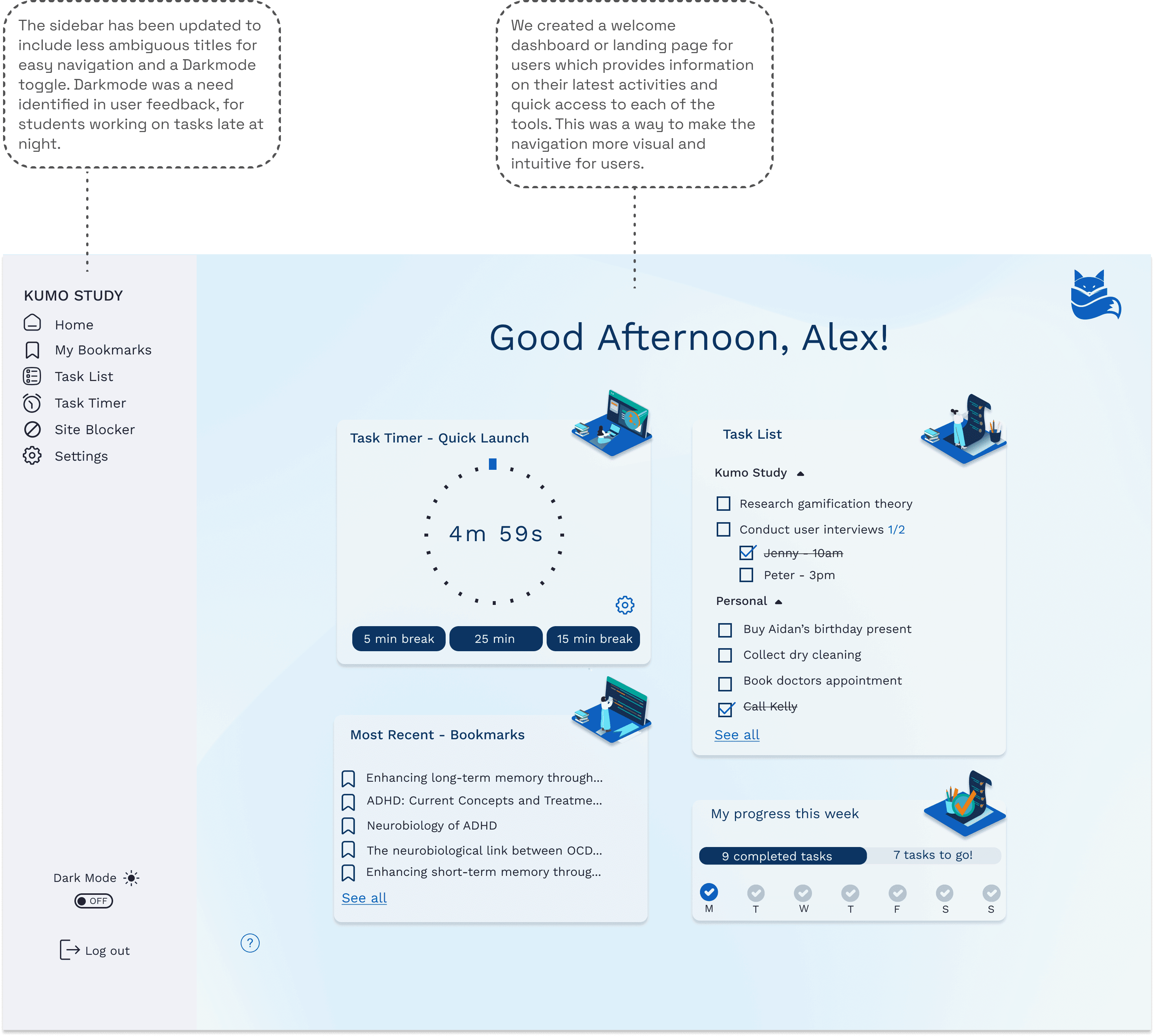
We created a welcome dashboard for users, which provides information on their latest activities using the tool, quick access suggestions and information on the progress of their study tasks.
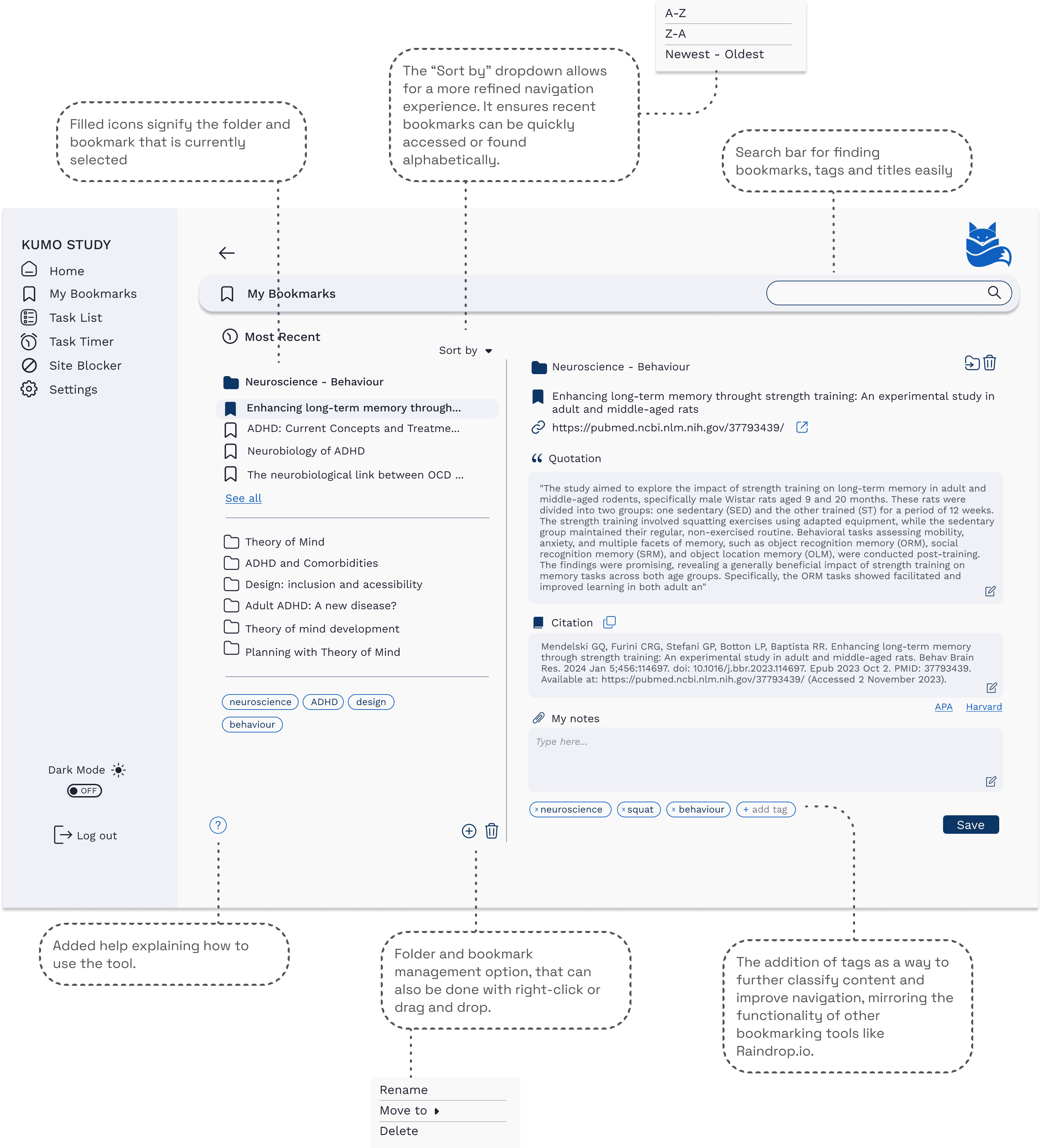
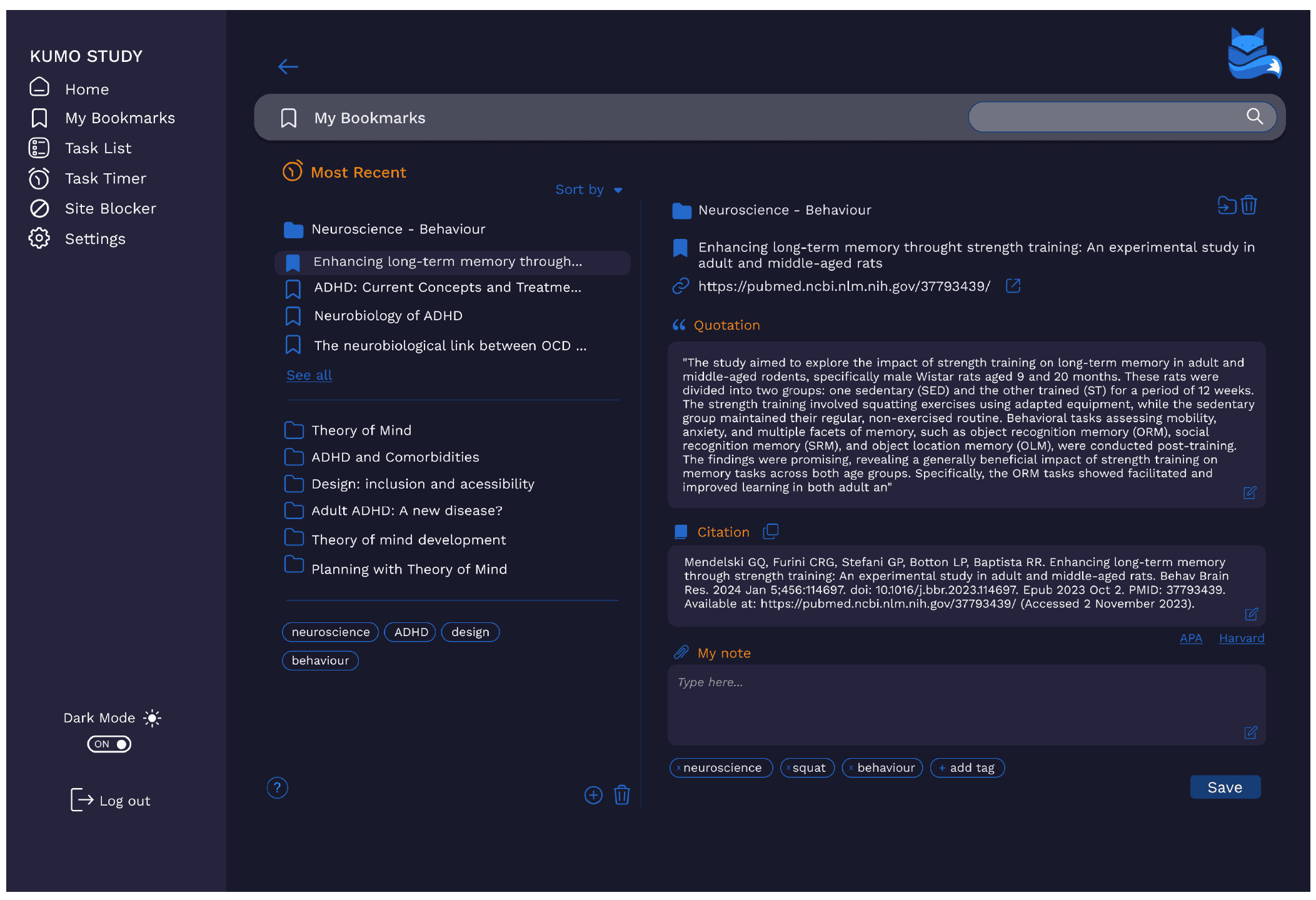
Bookmarking
For each tool we utilised a two column layout, to make the content more easily digestible for users. We provided support icons and messaging as a means to explain how the tools function. We also added numerous new features such as tagging, to ensure the product is competitive. The annotations below detail the changes made to the bookmarking tool.
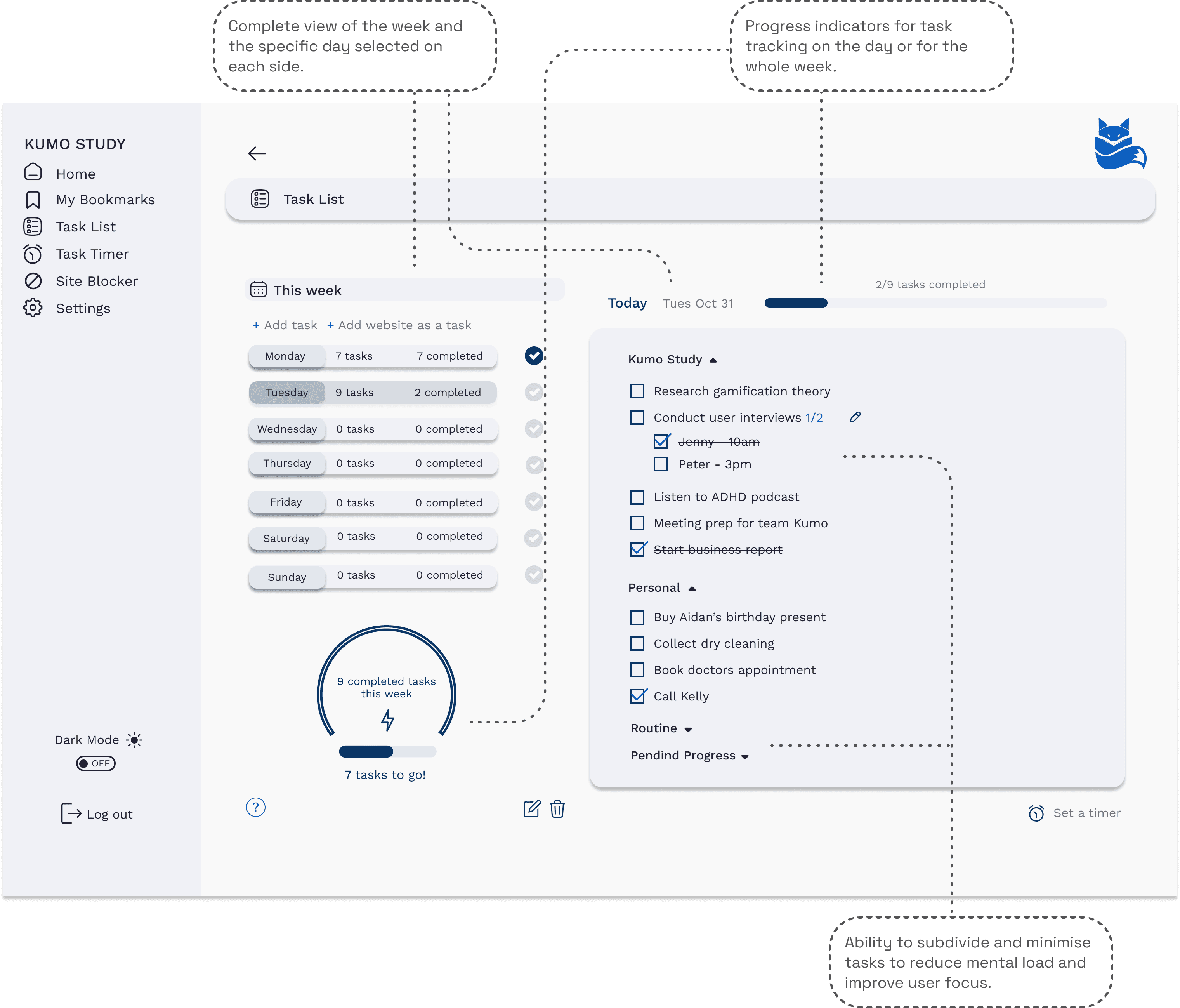
Tasklist
Using the two column layout we were able to divide tasks not only by day, but also by week. We also enabled users to subdivide and minimise tasks.
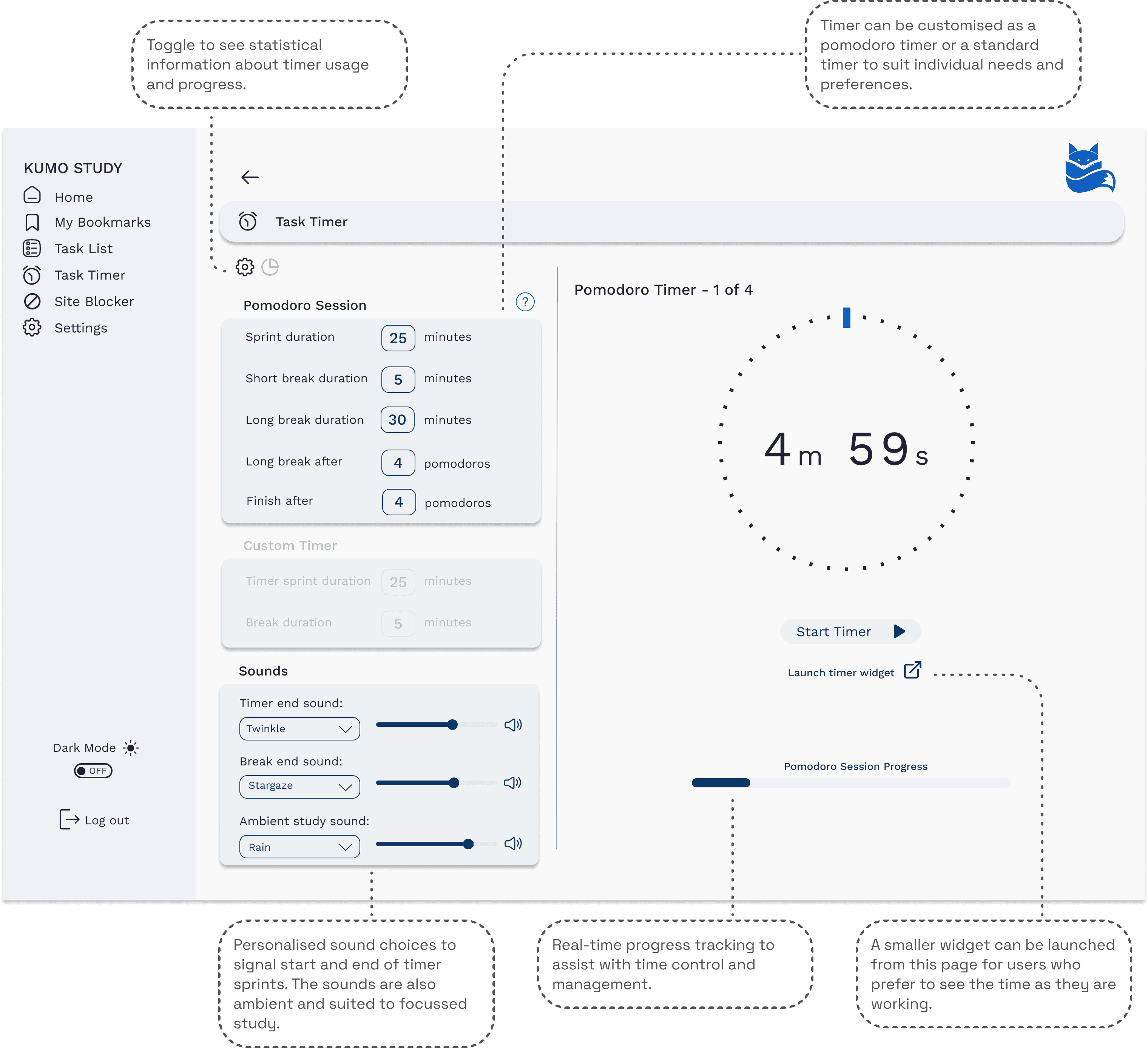
Task Timer
Taking inspiration from other task timers that allow for customisation and configuration according to individual preferences, we made the task timer include both pomodoro and standard timer functions. We also included the ability to soundtrack design sprints with calming ambient noise and the potential to launch a timer widget.
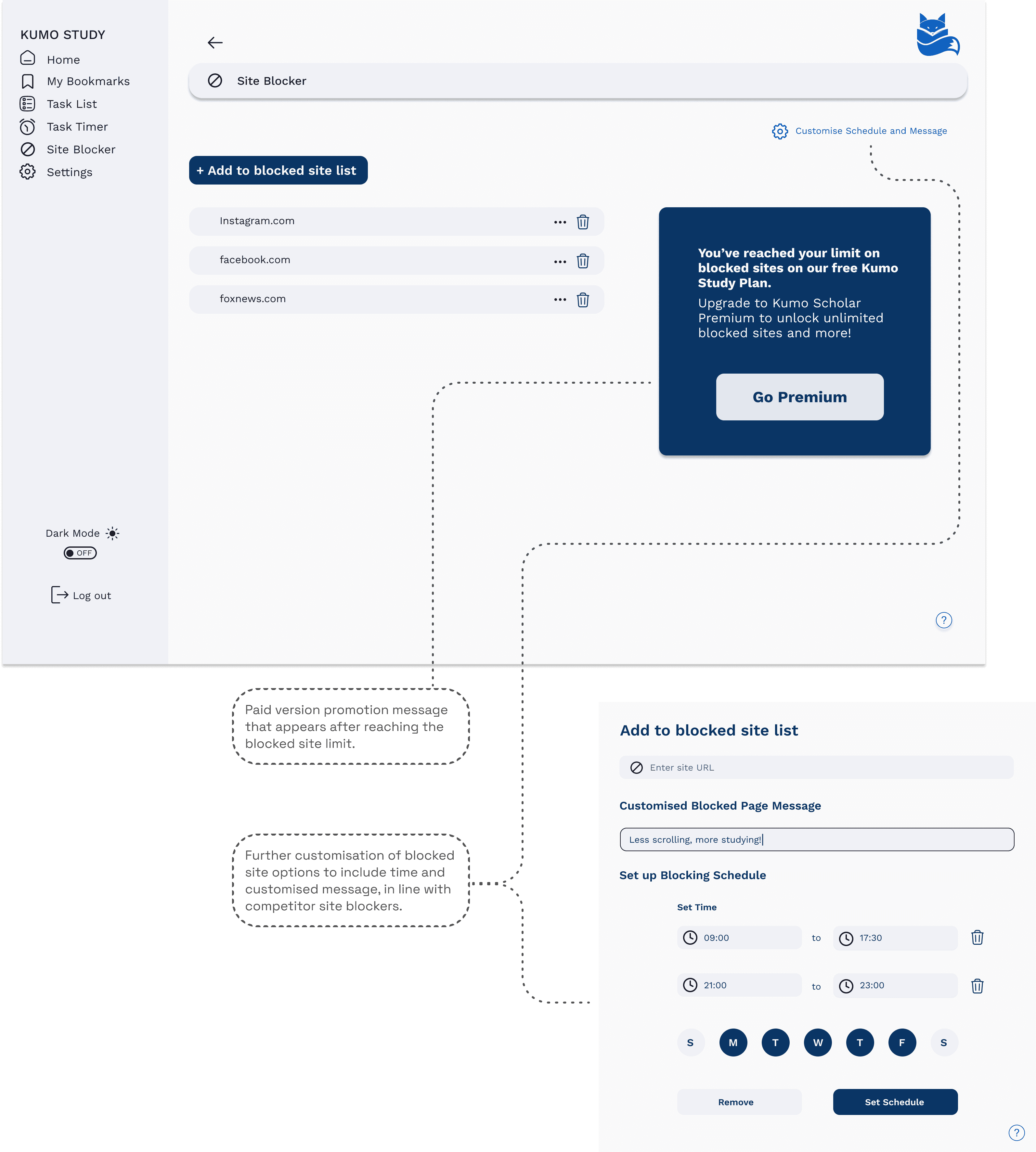
Siteblocker
The siteblocker did not involve too many changes. We did add some further customisation detailed in the annotations based on our research.
Darkmode
This was a feature requested multiple times in the feedback we received. I think it really looks excellent and suits the needs of users working late into the night.
Widget
To facilitate swift access and enable students to time their tasks as they work, we crafted a widget and established multiple access points for each of the tools. This gives Kumo more versatility, in line with some of the other tools on the market.
Website Redesign
Reflection
The discovery and development phase of this project momentarily felt quite open-ended. I observed the power of using an impact-effort matrix and collaborative project management tools like Trello to focus our design strategy and ensure that all designers and stakeholders have a shared vision. In this case, there was potential for more extensive changes like gamification and AI onboarding. Kumo openly envisioned some of these changes being made. However, we had to realistically assess what could be achieved within the timeframe available and how to make Kumo a successful, simple product that could compete with other single-function tools currently on the market. I believe we achieved so much in the timeframe, aided by our strong collaboration.
It was also rewarding to contribute to a product with such noble ambitions, and I could imagine myself using Kumo when I was a university student struggling to write long essays. I loved learning about the bookmarking plugins Raindrop and MyMind, and observing their simple yet intuitive UI design. They have since become workflow essentials for me. I look forward to seeing Kumo evolve in the future and hopefully finding a place in my digital inventory alongside these other amazing tools.